
Windows Updates Downloader
I found a super easy way to save windows updates.
First download and install the program. Then choose your windows language in updates list.
Select the file appropriate to your windows version. When presented with the option to open or save, simply open the UL and it will automatically install itself in the WUD program folder.
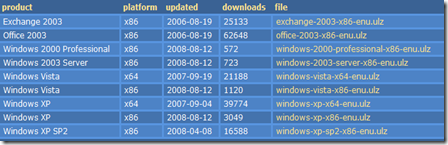
When you open the program you will presented with the available updates, choose among them and when you click download they will be saved in download folder.


Online Translators
 | Google translate |
 | BabelFish |
 | Windows Live Translator |
 | SYSTRAN |
 | GramTrans |
 | PROMT |
 | freetranslation.com |
 | Applied Language |
Free DVD: Windows Home Server
 Microsoft is shipping Windows Home Server’s 120 day tryout DVDs for free.
To obtain the DVD click here.

Select your location.

Select your country and continue.
 | There are four language options. Select the one you want and click buy now. |

Fill out your shipping information.
You will receive the dvd soon.
note: there is no shipping fee.
SUMo: Check Software Updates
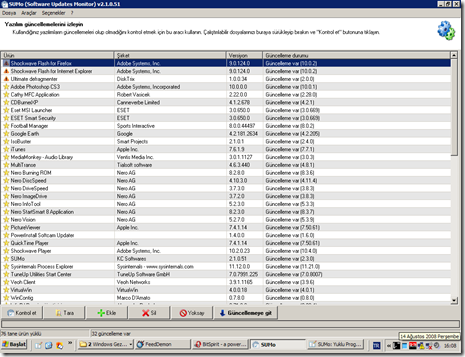
Thanks to SUMo (Software Update Monitor) you'll be able to keep your PC up-to-date by using the most recent version of your favorite software ! Unlike build-in auto update features, SUMo tells you if updates are available before you need to use your software.
Features
- Automatic detection of installed software
-
Detects required updates / patchs for your software -
Filter / authorize Beta versions (user setting) -
Ignore list : only tracks software YOU want to track -
More compatibility and less false positive than others Update Monitors (according to users feedback ;-) -
Internationalization support.
uTorrent 1.8 Released

My preferred torrent client uTorrent has been updated to ver1.8.
Currently my system has 512mb RAM, so i expect most programs to use the least memory possible. And uTorrent is great about it. It is only 260kb and does what a torrent client is supposed to do.
How To Dismantle LiteOn DVD Drive
Before you remove the drive from PC case leave the drive open so that its loading slot will stay out. Somehow I cant fully dismantle it if its closed.


Remove all the screws you can find.

Push the front nails.

Push the middle nails.

And that is it, you should have your DVD drive dismantled from it case. From here you can easily clean its laser head.
Ways to Access Blocked Websites
Proxy Programs – These programs direct your traffic to proxy servers which act as a middle man between your computer and your target website. So you are getting the content via proxy server.
Hotspot Shield – It is the fastest one I’ve tried.
torproject - foxtor (FF add on) - OperaTor
Changing DNS
Using IP Instead of URL – Most of the time websites are only blocked by their hostnames and not by their IP addresses. So instead of using their names you can try accessing them by using their IP addresses. Here is how to find it:
win+r / cmd / ping domain.com
Instead of domain.com just enter 66.150.120.145 in the address section of your browser.

Redirection with Short URL service
Using Cache services

Using Online Proxy sites
Proxy in Browsers
Use online translation services
Ultimate Shortcuts List
| Action | Shortcut |
| Activate Menu bar | Alt, or F10 |
| File menu | Alt+F |
| Edit menu | Alt+E |
| View menu | Alt+V |
| Undo the last operation | Ctrl+Z |
| Redo the last operation | Ctrl+Y |
| Cut the selected area | Ctrl+X, or ⇧ Shift+Del |
| Copy the selected area | Ctrl+C, or Ctrl+Ins |
| Paste contents of clipboard | Ctrl+V, or ⇧ Shift+Ins |
| Select everything in focused control or window | Ctrl+A |
| Delete selected file(s) | Del |
| Delete selected file(s) definitively | Shift+Del |
| Show help | F1 |
| Create a new document | Ctrl+N |
| Open a document | Ctrl+O |
| Save the current document | Ctrl+S |
| Print the current document | Ctrl+P |
| Zoom in/out on the document | Ctrl+Click Wheel (Scroll) |
| Reload the current document | F5, Ctrl+R |
| start of line | Home |
| end of line | End |
| start of document | Ctrl + Home |
| end of document | Ctrl + End |
| previous word | Ctrl+← |
| next word | Ctrl+→ |
| previous line break | Ctrl+↑ |
| next line break | Ctrl+↓ |
| Make selected text bold | Ctrl+B |
| Underline selected text | Ctrl+U |
| Make selected text italic | Ctrl+I |
| Change to upper/lower case | Shift+F3 |
| Make selected text superscript | Ctrl+Shift+(+) |
| Make selected text subscript | Ctrl+(+) |
| Switch to next/previous window | Alt+Tab / Shift+Alt+Tab |
| Switch to the next/previous window (without dialog) | Alt+Esc / Shift+Alt+Esc |
| Pop up window menu | Alt+Space |
| Minimize all | Win+M |
| Switch full screen/normal size | F11 |
| Show / hide desktop | Win+D |
| Close dialog | Esc |
| Moves keyboard focus to next/previous control | Tab / Shift+Tab |
| Toggle selected state of focused checkbox, radio button, or toggle button | Space |
| Activate focused button, menu item etc.. | Enter |
| Create new tab | Ctrl+T |
| Close current tab | Ctrl+W |
| Go to next/previous tab | Ctrl+Tab/Ctrl+Shift+Tab |
| Run new application | Win+R |
| Start menu / Applications menu | Win or Ctrl+Esc |
| Copy a screenshot to clipboard | Print Screen |
| Lock desktop/Switch active user | Win+L |
| Show desktop | Win+D |
| Task manager | Ctrl+Shift+Esc, Ctrl +Alt+Delete |
| Rename file | F2 |
Remove Unused Drivers and Devices
My Computer / right click / Properties / Advanced / Environment Variables /

Below the bottom Environment Variables window pane (System Variables), click on New. Enter for “Variable Name”:
“DEVMGR_SHOW_NONPRESENT_DEVICES”
and for “Variable Value” enter 1

Then My computer / right click / manage
right click Device Manager, click on View and then select Show hidden devices from the menu. You can identify the hidden devices by their grayed-out icons and remove them.


If you remove a piece of hardware without first uninstalling it in Device Manager, the drivers remains behind, but the device no longer shows up in Device Manager by default. By removing unused driver your system speed will not increase, but it is good for cleaning and may lower conflicts with new drivers, and may also prevent possible system errors.


Regedit Settings to Decrease Shutdown Time
win+r –> regedit
* HKEY_USERS\.Default\Control Panel\Desktop\
AutoEndTasks, modify the Value data to 1.
* HKEY_USERS\.Default\Control Panel\Desktop\
Set WaitToKillAppTimeout value to 1000
Set HungAppTimeout value to 1000
* HKLM\SYSTEM\CurrentControlSet\Control\Session Manager\Memory Management\
Set ClearPageFileAtShutdown value to 0
* HKEY_CURRENT_USER\Control Panel\Desktop\
Set WaitToKillAppTimeout value to 1000
Set HungAppTimeout value to 1000
* HKLM\System\CurrentControlSet\Control\
Set WaitToKillServiceTimeout to 1000
Other settings:
Disable any hardware driver that you will not use such as modem (dial-up) and diskette driver.
How to Make FeedDemon Portable

If you want to access your feeds from any computer you use even the public ones and you prefer a desktop solution over online alternatives and FeedDemon is your favorite feedcacher, here is how you can configure it to use it as a portable software.
First install FeedDemon to your USB drive. Open it, then from “file / manage cache” change the cache folder to somewhere in your USB.
For the second part, open regedit (win+r –> regedit), search for Bradbury. Right click / extract / save the file in your USB.


Whenever you want to use it on different computer click on click that reg file first. It will insert your settings to the new computer (thus your cache will be in your USB, as long as the drive letter for your USB is the same as the first computer you created the reg file).
You can also create a couple of registry settings each with a different drive letter by editing the reg file with notepad.
If all these steps seems complicated and you prefer an easier solution you can download this little application I created to do all this steps for you.

You can either type the folder path of your cache or you can select it by using “choose cache folder” button. Then you just have to click “add to registry” button. After you finish your session, you can also delete all registry settings created by FeedDemon by using “clean registry settings” button.
How to Convert Videos with VirtualDub
First step is to download VirtualDub. Then drag and drop your video file onto VirtualDub. Select audio / full processing mode / compression / lame mp3 / 48000Hz, 128kbps /
 |  |
 |  |
If you do not have x264 codec download and install KLite codec pack first.
Best Places to Train Your Fallensword Character

| Levels | Area | Creature |
| 1-2 | Mountain Path | Goblin |
| 3-4 | Fire Chasm | Vampire |
| 5-8 | Elya Plains North | Shambler |
| 9-10 | Elya Plains South | Rock Golem |
| 11 | Otha Caves | Nomad Magi |
| 12-14 | Krul Beach Forest East | Slime Golem |
| 15-19 | Galo Caves | Orc Brute |
| 20-24 | Paladir Forest East | Nightshade |
| 25-27 | Ramdal Caves | Zombie King |
| 28-29 | Udan Forest | Shadow Dwarf Assassin |
| 30-31 | Crystal Caverns (Entrance) | Gargoyle |
| 32-33 | Burning Abyss lvl 1-2 | Crazed Fire Mage |
| 34-36 | Gargoyles Den lvl 1-2 | Overcharged Spirit |
| 37-39 | Eerie Moors East | Lost Soul |
| 40-44 | Eldira Port South | Vampiric Raptor |
| 45-47 | Hallows Caves lvl 4 | Thunder Golem |
| 48-52 | Death Gorge East | Ravager |
| 53-54 | Klar Labyrinth (Level 2) | Aquatic Horror |
source
Fallensword Item Set List

Found this on fallensword forum. With it you can easily plan your item buying strategy. For xls file click either Megaupload or Rapidshare. (update: links are dead you should use this wiki instead)
You can also use fallensword calculator to compare different items, sets, skills, buffs etc.
Play online browser based RPG Fallensword for free.