
Yahoo is new Big Brother

Online privacy became the big issue of our generation especially after the technological trend of being online everywhere and every time. It's quite understandable that every government wants to have all the information it can get about its citizens for political, economical and most importantly safety reasons. Likewise companies want to access information about its customers so that they can know more about their market. And its no different for Yahoo.
biztipsblog
Yahoo Group Users - Attention, I received this information on a discussion list for a master mind group I'm a member of. If you, like millions of others, use Yahoo Groups to connect with clients, classes or other discussion groups, you may want to read this:
Yahoo is now using something called "Web Beacons" to track Yahoo Group users around the net and see what you're doing and where you are going (similar to cookies.) Yahoo is recording every website and every group you visit. Take a look at their updated privacy
statement:
1. http://privacy.yahoo.com/privacy
2. About half-way down the page, in the section on Cookies, you will see a link that says Web Beacons. Click on the phrase "Web Beacons".
3. That will bring you to a paragraph entitled "Outside the Yahoo Network". In this section you'll see a little "click here to opt out" link which will let you "opt-out" of their new method of snooping.
4. Once you have clicked that link, you are exempted.[Notice the "Success" message on the top of the next page. Be careful because on that page there is also a "Cancel Opt-out" button which, if clicked, will *undo* the opt-out. It appears after you have hit the opt-out button so is very confusing.
Restart the Explorer when Windows hangs

One of the most popular source of annoyance in Windows is hanging of the explorer. We will not get into the causes of this problem because there are many possible issues.
Here is a simple solution (at least temporary) for that problem but this will only work if Windows is still responsive.
Shut down the Windows Explorer by hitting Start => Shutdown (Turn off Computer on Windows XP) and click cancel on the shutdown dialog while holding the CTRL, Shift and ALT keys.
This kills the explorer.exe process and all that we have to do now is create a new explorer.exe process to access all windows and functions again in Windows.
Then fire up task manager, click on File => New Task and enter explorer.exe in the window. This will restart the Windows Explorer and hopefully brought the desired result.
You can open the Task manager with CTRL + ALT + DEL . (or Ctrl + Shift + Esc).
msdn
Related:
Save Internet radio tracks with Free MusicZilla

Both price per gigabyte for storage and price per megabyte/second for bandwidth is falling consistently. Apart from this there is also a surge in online music services where you can buy your favorite tunes for just under $ 1. But on the other hand there is also the irresistible sweetness of free music; internet radios.
Listening to the same albums and songs becomes boring after a while, no matter how great songs we have in our archives. That is if you don't pirated all the new albums that you can find. There comes internet radios to our rescue; both legally and tastefully.
If you like listening online radios but also want to save your favorite tracks for offline use there is an option for you. With incredibly easy to use Free Music Zilla you can visit a site with streaming audio like Pandora, Last.fm, IMEEM, MySpace, eSnips, or several others and Free Music Zilla will give you the option of saving each song you listen. Just install the application and it will hang out in your system tray.
Anarchy Online Remains Free For 2011

Development of the science fiction themed game was lead by project director Gaute Godager and story developer Ragnar Tørnquist at a time when most role playing games made use of the more common fantasy setting (Released in the summer of 2001).
source: Anarchy-Online
via: Game | Life
Tag Cloud in Blogger

Tagging became popular after the increase in Web 2.0 applications, especially in blogging among others. It allows to easily categorize and identify individual posts so that one can find related posts. When a reader clicks a tag, he is directed to an index page listing all the posts associated with that tag. That way readers spend more time on the blog looking for the posts they are more likely to be interested. One other advantage of tags is that blog software tracks and updates all connections between the posts with it.
There are all kinds of tagging visualization systems, the one we are particularly interested is "tag cloud".
If you want to have a tag cloud widget on your blog check out this tutorial.
How to Disable Vista Aero Effects While Playing Game
And here is how to do it:
Right-click on the shortcut of the game and choose Properties, and then the Compatibility tab ... Now on the Settings block check the box for "Disable desktop composition" in order to disable Aero the next time you use the shortcut.
Don't expect a performance boost after, you may not even recognize the difference. But still any increase is an increase :)
source: HowToGeek
Facts from Microsoft about Vista

People like complaining, and one of the most popular complaint in tech world is about Vista. Like all other OSs and softwares Vista has its share of faults. But before complaining you should know some vital facts about Vista:
- Majority of Windows Vista-based PCs boot in less than a minute.
- Majority of all Windows Vista-based PCs resume from sleep in less than 6 seconds.
- Windows ReadyBoost is a terrific new innovation in Windows Vista that lets you speed up your system in seconds, and PCs running Windows Vista that are equipped with 512 MB memory experience a performance boost of up to 40 percent.
- Windows Vista users generally experience 20 percent fewer application "hangs" than those running Windows XP.
- Based on their first 180 days of availability, Windows Vista has been shown to have fewer vulnerabilities than Windows XP or Mac OS X 10.4.
- Windows Vista security has improved so much that PCs running it are 60 percent less likely to be infected with viruses, worms, and rootkits than PCs running Windows XP SP2.
- And Windows Vista-based PCs are over 90 percent less likely to be infected than systems running Windows XP without a Service Pack.
- Windows Vista-based PCs are almost three times less likely to be infected with potentially unwanted software than Windows XP-based PCs because of Vista shipping with Windows Defender.
- Internet Explorer 7 is now blocking nearly 1 million attempts to access these fake sites per week. New phishing attacks are more than 25 times as common as new viruses. That's right, over 20,000 of these fake websites are created every month.
source: http://www.microsoft.com/windows/products/windowsvista/facts.mspx
Shortcut to Launch Multiple Programs
We may have hundreds of programs installed on our system but we only use couple of them on occasional basis (that is why I prefer portable programs) and some of these installed programs come preconfigured to load on windows startup. I suggest you clean these programs from windows startup (only leaving the programs that you are sure you will need every time you log on windows) by either using MSConfig or using a specialized program like Autoruns from SysInternals.
After cleaning the start up programs you can create a batch file to start all your favorites ones with just one click. And here is how to do that:
Open Notepad (Start Menu -> Accessories -> Notepad):
Get the paths for the programs you want to start. The easiest way to do this is to right-click on each of the existing shortcuts, choose the Properties option, and then copy the Target path.
Enter the paths for each of the programs into Notepad, one per line. Be sure to write
start ""
at the beginning of each line, and put a space after it to separate it from the application path. If the path of your application has a space in it, you'll need to surround the entire path with quotes.
Save it as a .bat file by manually entering in the extension at the end of the file name.
In the end you should have something like this:
start "" "C:\Program Files\Opera\Opera.exe"
start "" "C:\Program Files\Windows Live\Messenger\msnmsgr.exe"
start "" "C:\Program Files\FeedDemon\FeedDemon.exe"
With this method your Windows will load a little much faster depending on your hardware.
Vista drive icons for Windows XP
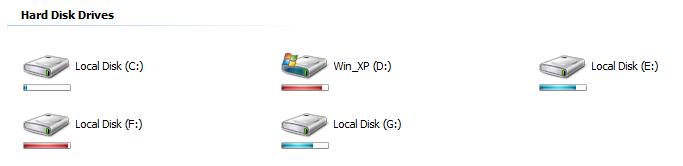
There are lots of improvement in Vista over XP but for a lot people the best change is Vista’s look. And luckily there are all kinds of transformation tools for your Windows XP to make it look like Vista. Here is one for just changing the drive icons: Vista Drive Icon. With this little tool you can have Vista like drive icons with storage indicator in XP. You can download the open source program from SourceForge site.
Vista Drive Icon, changes the drive icons shown in Windows "My Computer", to a nearly Vista drive icon, showing the drive's free space with a smooth colored horizontal bar.
DriverMax to Archive and Update Your Device Drivers
With DriverMax you can create a backup of your currently installed drivers. It is a free program which allows you to archive your currently installed drivers and does the installations all at once when you need to reinstall them. If you register DriverMax (which is free) you can also update your drivers (free version allows two updates per day).
How to update your drivers using DriverMax:
Open DriverMax then go to Updates and Identification and click the "Check for driver updates" item.

DriverMax will automatically open a web page containing the list of drivers installed on your computer. For each driver, you will see the version you have and the latest version that is available.
In order to update a certain driver from the list, just click on the diskette icon that is located on the right side of the screen. You will be taken to another page, which shows you the driver versions which are available for download. Pick a driver version, click the download link, and choose the Open option when asked whether you want to Open, Save or Cancel!
A small file with the extension .DMX-INFO will be downloaded. The .DMX-INFO file contains information about the driver you are about to download. The DriverMax Agent will start, and ask you whether you want to add the driver to the download list. Choose Yes.
The DriverMax Agent will wait in your system tray, and will download the driver when possible. This may take some time. You can double-click on the DriverMax Agent system tray icon to check the status of the download.

DriverMax only works on XP/2003/Vista.
You can also try Driver Magician Lite and SlimDrivers which are also free.
MyMiniCity.com - A Sims-like City of Your Own

Have you ever dreamed governing a city, solving the problems of your fellow countryman? If you have, or better yet if you like SimCity type of games then MyMiniCity is a nice online game for you. You only need to choose a name for your city and the country to which it belongs. And that’s all you need to build your very own city on MyMiniCity. It doesn’t require any downloads, registration or log-ins. Once you’ve named your digital abode, you’ll be given a link with which to visit it. The more you visit and the more you market the place, the more inhabitants you’ll get. So it’s better to tell the world about your city and have as many visitors as possible. But the game doesn’t stop there. New challenges arise: unemployment, sanitation, education etc. To improve any of these, you’ll have to do some heavy promoting. Every click does your city good. Visitors can leave messages on the bulletin board. You’ll have a view of the city’s stats., e.g. crime, population and pollution. Not too shabby, if you like to be master of a digital domain.
my cities: imperialville dzebel
City Factors:
Population (You begin with this)
Industry (50 population) add /ind to the end of your city url
Transportation (100 population) add /tra to the end of your city url
Security (250 population) add /sec to the end of your city url
Environment (500 population) add /env to the end of your city url
Business (1000 population) add /com to the end of your city url
source
Access Blocked Facebook, MySpace or YouTube with Secure https(ssl) Proxies

Some network administrators (or parents) block certain websites like Facebook, MySpace or YouTube (for company’s good or for your own good). But sometimes this causes even the most innocent(!) websites to become inaccessible.
In order to circumvent the block and access your websites you can use an online proxy site to visit them. These proxies even work for bypassing countrywide censorship like those that imposed in Iran, Saudi Arabia or Chine.
Some of the best ones:
https://spacepiano.com
http://www.mousematrix.com
https://cakebird.com
https://cheeseglobe.com
http://atunnel.com
(you can also put any letter in front of tunnel such as btunnel.com, ctunnel.com all the way to the ztunnel.com)
http://calculatepie.com
http://kproxy.com
http://www.stupidcensorship.com
http://www.vmathpie.com
http://www.backfox.com
http://www.newbackdoor.com

Found the proxies via DevilsWorkshop
Related Ways to Access Blocked Websites
How to watch Fox, ABC or NBC outside of USA
How to quickly replace the file extensions of several files
For this example we will change all the files with an *.asp extension to a *.htm files.
If you want to keep the original files just in case use the below command at the CMD prompt or within a batch file:
xcopy *.asp *.htm
rename *.asp *.htm
What if your files do not have any extension at all (there are programs that come in archives with text files that do not have extensons). For example if you want to add txt extension to all files in a folder open command prompt (win + R / cmd), navigate to your folder than enter the below command.
ren * *.jpg
War of the Browsers


Here is Opera, has everything one would need for surfing by default without the need for add-ons.


from: myconfinedspace
How to add custom cursors to your blog

One of the most appealing feature of blogging is that most of the blogging platforms offer easy customization. You don't have to stuck with default themes and other visual elements. You can either design your own custom theme, favicon and even cursor or you can choose and apply from among the thousands of free ones available on the Internet.
In this post I will try to show you how you can change your cursor for your blog.
Here is how to do that:
1. Find a cursor you like on the Internet or design yourself.
- Cursors have their own file formats, which you'll be able to identify by the file extensions .cur and .ani. The .cur extension is for static cursors, whereas the .ani extension is for animated cursors.
- The easiest and best way to design your own cursor is to use a specialized cursor editor,such as IconArt or use Imagine to convert images to ani/cur files. You can also try designing one online within your browser.
- If you find the idea of designing your own cursor too challenging, plenty of cursors are available on the Internet free of charge-just type "free cursor" into Google. Look for cursors with .cur and .ani extensions. You will find tons of them.
2. Upload it to a hosting service (make sure the service supports *.cur or *.ani files).
3. Insert the code to your page. ("about me" page for MySpace profile).
Some websites offer all in one solution; cursor, hosting and code. You just have to choose your cursor and apply its code to your blog. (i.e. TotallyFreeCursors )
Code example for websites/blogs:
Don't forget to replace the URL<style type="text/css">
<!--
body {cursor: url('http://svr1.cursorhost.com/081008/1223460287x4gwg3.cur');} -->
</style>
http://svr1.cursorhost.com/081008/1223460287x4gwg3.cur
with your link of your cursor from the hosting site.
Free cursor hosting site:
http://www.cursorhost.com/
related:
Vista drive icons in Windows XP
Custom Cursors for XP
Specialized search engines